
How a Cron Job Built to Fail Safely Kept Writing Errors to a Log Nobody Read
We run post-publication tasks for our video channel every 30 minutes using a simple shell script and cron, with no LLM involved. The morning after a temporary backfill script finished its job and removed itself from crontab, the remaining production cron started failing with 401 errors. Here is a record of how a script designed to fail safely ended up piling errors into a log file nobody was checking, and how I ultimately wired alerts into my daily git status.

In “How Our Automation Agent Burned $23 in One Night,” I looked back on an incident where an AI agent set up its own cron job and drained our API credit overnight, which led me to a firm rule: never put an LLM inside a recurring scheduled script.
Today, the post-publication workflow for “Sounds of Rain in Old Japan” still runs every 30 minutes via cron using a plain shell script with no LLM in the loop. Whenever a new Short goes public on YouTube, this cron job posts a comment linking to the related long-form video and cross-posts the clip to Instagram Reels.
This article is a record of what went well running these automation scripts in October, and an unexpected blind spot I stumbled into along the way.
Since the May incident, keeping LLMs out of scheduled jobs has prevented runaway API calls. However, a human is obviously not watching background processes around the clock either. I ended up facing a very basic problem: even if you design a script to exit safely on error, it does not do much good if no human notices that it failed.
A Script That Deletes Itself When Its Job Is Done
When I started automatically cross-posting to Instagram in August, 33 older Shorts that were already public on YouTube remained unposted on Instagram. Because the daily monitoring script only looks at videos published within the past three days, those 33 videos would never be picked up on their own.
To handle them, I wrote a temporary backfill script that worked backward through the archive, posting a few videos a day to Reels, and automatically removed its own entry from crontab once all 33 were published.
I took care with a few design details.
First, I froze the list of target videos into a plain text file before the first run. If the script queried the API dynamically on every run to calculate what was left, newly published videos could get mixed in, blurring the completion condition or causing duplicate posts alongside the regular production script.
Second, I defined completion by the count of finished videos rather than by a calendar end date. If a network error or API rate limit caused a failure on a given day, the overall completion would simply shift back by a day without dropping any videos.
Finally, I guarded the self-removal step so that it would only rewrite crontab after confirming that crontab -l had read the existing schedule cleanly.
Over about ten days, the backfill script posted all 33 videos as planned, wrote the following final lines to its log, and deleted itself from crontab:
2026-10-07 19:11:18  backfill edo_kyoto_machiya  posted  18639591748050694
2026-10-07 19:11:18  backfill BACKFILL COMPLETE
2026-10-07 19:11:18  backfill complete — removed the cron entry, nothing left to post
Everything finished cleanly, leaving only the main recurring monitoring script in crontab.
Failing with 401 Errors the Next Morning
Then, at 4:30 a.m. on October 8—just hours after the backfill completed—the remaining production cron job started failing:
2026-10-08 04:30:02  FAIL  youtube comment
2026-10-08 05:00:05  FAIL  instagram reels
2026-10-08 05:30:03  FAIL  youtube comment
…
2026-10-08 12:00:04  FAIL  youtube comment
The YouTube Data API was returning 401 Unauthorized on every run.
Because the Instagram cross-posting script also checks YouTube’s publication status as its trigger, both tasks came to a halt, stopping the entire post-publication batch workflow.
Exiting Safely on Error, with Nobody Noticing
Drawing on past lessons, I had built several safeguards into this script.
One was making sure it never opened a browser prompt for OAuth re-authentication when running under cron. In a headless environment, trying to launch a browser leaves the process hanging indefinitely while waiting for input that never comes, so I had configured it to fail immediately with an error code whenever authentication broke.
I had also designed it to write nothing to the log when there were no new videos to process. Writing “nothing to do” every 30 minutes fills the log file with noise and makes real events harder to read.
On the morning of October 8, the script behaved strictly as intended: it exited cleanly with an error code without hanging, and it recorded each failure to the log file.
The problem was that the log file lived in a local directory I rarely opened.
In my day-to-day development work, I spend my time looking at git status and the Git panel in my editor. A log file ignored by Git never enters my field of vision unless I deliberately go looking for it. And because the script had been running reliably for weeks, I had no habit of opening that log file every morning to check on it.
From 4:30 a.m. until early afternoon when I finally noticed, the script recorded a failure every 30 minutes. With no notification hook or external monitoring service attached, hours went by without my knowing anything was wrong.
I had been so focused on making sure the process exited safely without hanging that I completely missed the question of how I would detect those failures during my normal daily workflow. It is a bit embarrassing to admit, but because Sounds of Rain in Old Japan serves as an active testing ground where I am always trying several new things in parallel, my head was full of the next experiment and I overlooked the basics.
A Valid Token Rejected Half the Time
When I started investigating, the cause of the error turned out to be puzzling in itself.
Suspecting an expired token, I paused before re-authenticating and ran 30 consecutive test calls against the API using the exact same token. The result was strange.
Fourteen calls succeeded; sixteen failed with a 401 error.
Even after I forced a token refresh and tested the newly issued token, eleven calls succeeded and nine failed. Google’s token inspection endpoint reported the token as valid, and the machine’s system clock matched Google’s server time down to the second.
In short, even though the token was completely valid, the API was rejecting it roughly half the time. I have no way of knowing what was happening inside Google’s infrastructure that morning.
Had I simply assumed the local token was corrupted and re-authenticated without testing, I probably would have missed what was actually happening.
I addressed the issue by raising the retry limit. The official Google client library I was using capped automatic retries on 401 responses at three attempts; in an environment where each call only succeeds 50% of the time, a single request still has more than a 10% chance of failing after three retries. In a batch job that makes dozens of API calls to process a single video, the script is almost guaranteed to hit that limit somewhere and abort.
Once I raised the retry limit to ten attempts, all 30 test batches ran through to completion reliably.
Monitoring via git status
That left the question of how to notice future failures. I considered standard notification channels: sending a WhatsApp message, firing an email alert, or calling a Slack webhook.
What gave me pause was the risk of the notification mechanism itself breaking.
I have had plenty of experiences in the past where an external service’s token expired, a brief network blip dropped a webhook, or an alert email landed in spam—leaving the notification system silently broken right when an error needed to be delivered. I wanted to avoid the circular trap of building a second monitoring system just to watch the notification system.
For a project of this size, I felt the best fit would be something that does not depend on external services and naturally crosses my path during daily work. So I decided to connect failure detection to git status, a command I run every day without fail.
I placed a single tracked file named cron_health.md inside the repository and updated the cron script so that it rewrites the contents of this file only when a job fails three times in a row.
When the file is modified, a diff appears in the working tree and an uncommitted-change badge shows up in the editor’s Git panel. Whenever I run git status or open my editor for daily work, the failure catches my eye naturally.
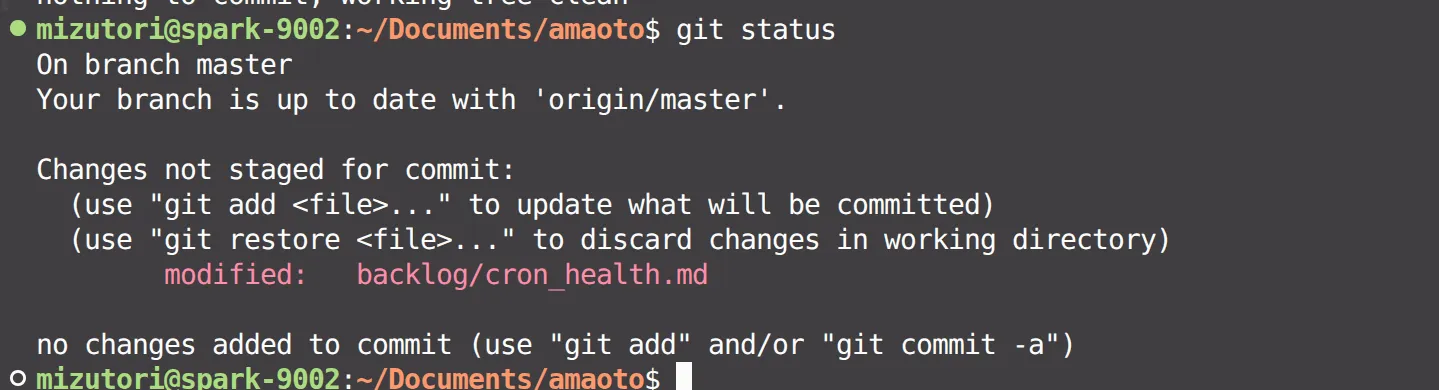

It is a small mechanism, and I made sure the file remains untouched while everything is healthy. Writing a timestamp on every successful run would leave a permanent diff in the working tree, so on a clean run the script restores the file to its baseline state, keeping git status completely clean unless something is actually broken.
Earlier, when discussing whether to build an expiration alert for our Instagram token, I had told the agent: “I check the Instagram screen every day anyway, so we don’t need an elaborate notification system.”
Rather than adding another notification tool, surfacing a minimal diff in the place a human already looks every day turned out to be the most natural approach. It may look manual at first glance, but fitting the signal into existing daily habits handles the problem with the least wasted energy and stress.
Designing to Stop on Error, and Designing to Notice
I still believe the decision to keep LLMs out of recurring cron scripts was the right one. Both troubleshooting this outage and wiring up the recovery logic were straightforward to handle within plain shell scripts.
Even so, once a process runs asynchronously in the background, a human is not going to be sitting there when something goes wrong.
Making sure a process fails safely without hanging is only half of the design; the other half is making sure that failure sign naturally enters your line of sight during ordinary daily work, without requiring you to open a dedicated monitoring dashboard.
If you are thinking through workflow automation for a small team, or how to design reliable operations that catch failures without heavy monitoring overhead, feel free to get in touch. I would be glad to help draw on what we have learned from running these systems day to day.