
How Our Automation Agent Burned $23 in One Night
A record of the incident in which the automation agent running our YouTube pipeline drained its API credit overnight. A cron job the agent created on its own, a session bloated to 10 MB, and the 47 turns it spent believing it had already stopped the job. I am sharing it because others are likely to fall into the same trap.

On May 9, 2026, the automation agent for the YouTube pipeline I was running in our office (OpenClaw + Claude Sonnet 4.6) drained its API credit overnight. The amount was $23.82. There was more to learn from the way it burned than from the amount itself, so I am sharing this as a record.
Four Key Facts Up Front
- The agent created, on its own, a cron job to check every five minutes on an ffmpeg process that takes hours.
- Every time the cron job fired, it re-fed the entire session history, bloated to 10 MB, into the LLM.
- In one night, 96 fires × roughly $0.25 = $23.82 disappeared. I found out when the credit ran out and everything stopped automatically.
- Partway through, the agent had correctly decided that the cron job was no longer needed. It only got the way of stopping it wrong. The 47 job invocations from that point on, about $12, were the price of a single mistaken assumption.
Background of the Pipeline
On a YouTube channel called Sounds of Rain in Old Japan, I publish long-form work-BGM videos of rain falling on landscapes from each era of Japan. The steps for making one video are as follows.
- Generate images from scene information (era, place, season, etc.) with Nano Banana Pro
- Generate video clips from the images (Kling AI at the time, 15 seconds)
- Select rain audio (from our own library)
- Loop and crossfade the clip and audio to extend them to several hours (assemble.sh = ffmpeg). This takes hours (in this incident it ran for 4 hours 41 minutes and died)
- Create Japanese metadata + translate it into multiple languages
- Generate a thumbnail + upload a draft to YouTube
To operate this from a WhatsApp chat with myself, I handed it to an agent runtime called OpenClaw and automated it. The agent’s model is Claude Sonnet 4.6 (via the Anthropic API, pay-as-you-go). The pipeline as a whole is described in “We Handed an Entire YouTube Channel to an AI Agent.”
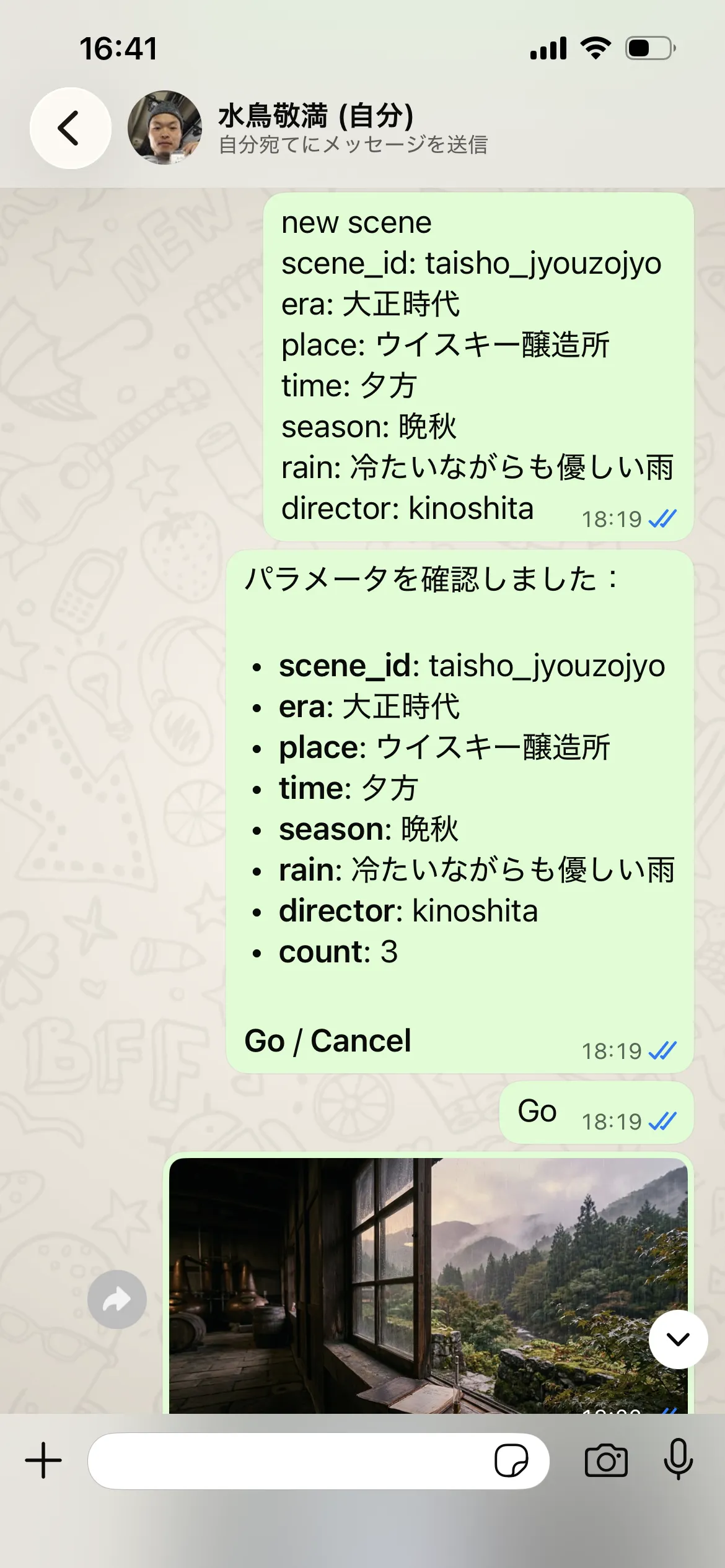
This is the actual exchange from the day of the incident. I sent the parameters at 18:19, replied “Go” to the agent’s confirmation, and the generated images started arriving. Up to this point, it was the usual peaceful pipeline. The agent registered the cron job in question 16 minutes after this.
Incident Timeline
A timeline reconstructed from the actual logs (all times JST).
| Time (JST) | Event |
|---|---|
| 2026-05-08 evening | New scene taisho_jyouzojyo (a Taishō-era brewery) ordered via WhatsApp |
| ~18:30 | Image generation → video generation → audio selection → assemble.sh launched (target: a 6-hour video) |
| 18:35:23 | The agent creates, on its own, a cron job to check on assemble every 5 minutes (cron tool, action: add) |
| 18:40:44 | First cron fire. Every 5 minutes thereafter |
| 22:35:18 | assemble.sh dies with SIGKILL. At time=04:40:58.96 of the 6-hour video. Suspected OOM |
| 22:36:04 | The agent notifies me of the failure on WhatsApp (this part was correct) |
| 22:37:00 | The agent decides “this cron job should now be stopped” → believes it has stopped it by returning NO_REPLY (it does not stop) |
| 22:37 → 03:45 | The cron job, still watching a dead process, fires 49 more times |
| ~03:55 | Credit exhausted. Subsequent fires fail with LLM request rejected: Your credit balance is too low... (12 consecutive errors) |
| Next morning | I open the API console and find out |
97 fires in total (18:40:44 → 03:45:40 the next day). 96 of them were billed; the last one came after the credit had run out.
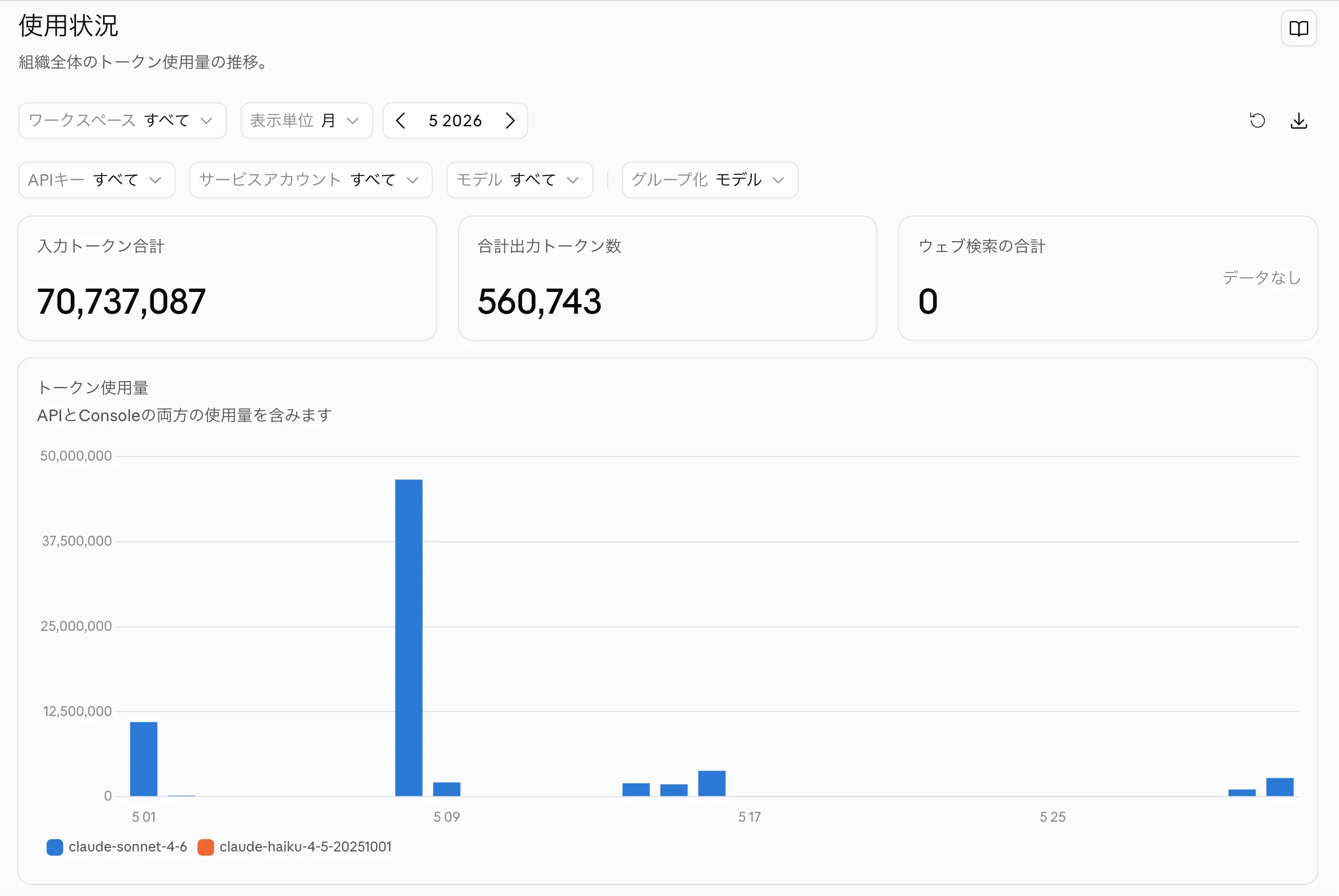
This is the actual API console screen for May. Of roughly 70.73 million input tokens for the month, the bar for May 8 alone stands out at about 46 million. You can see at a glance that more than half of the month’s usage piled up in this one night.
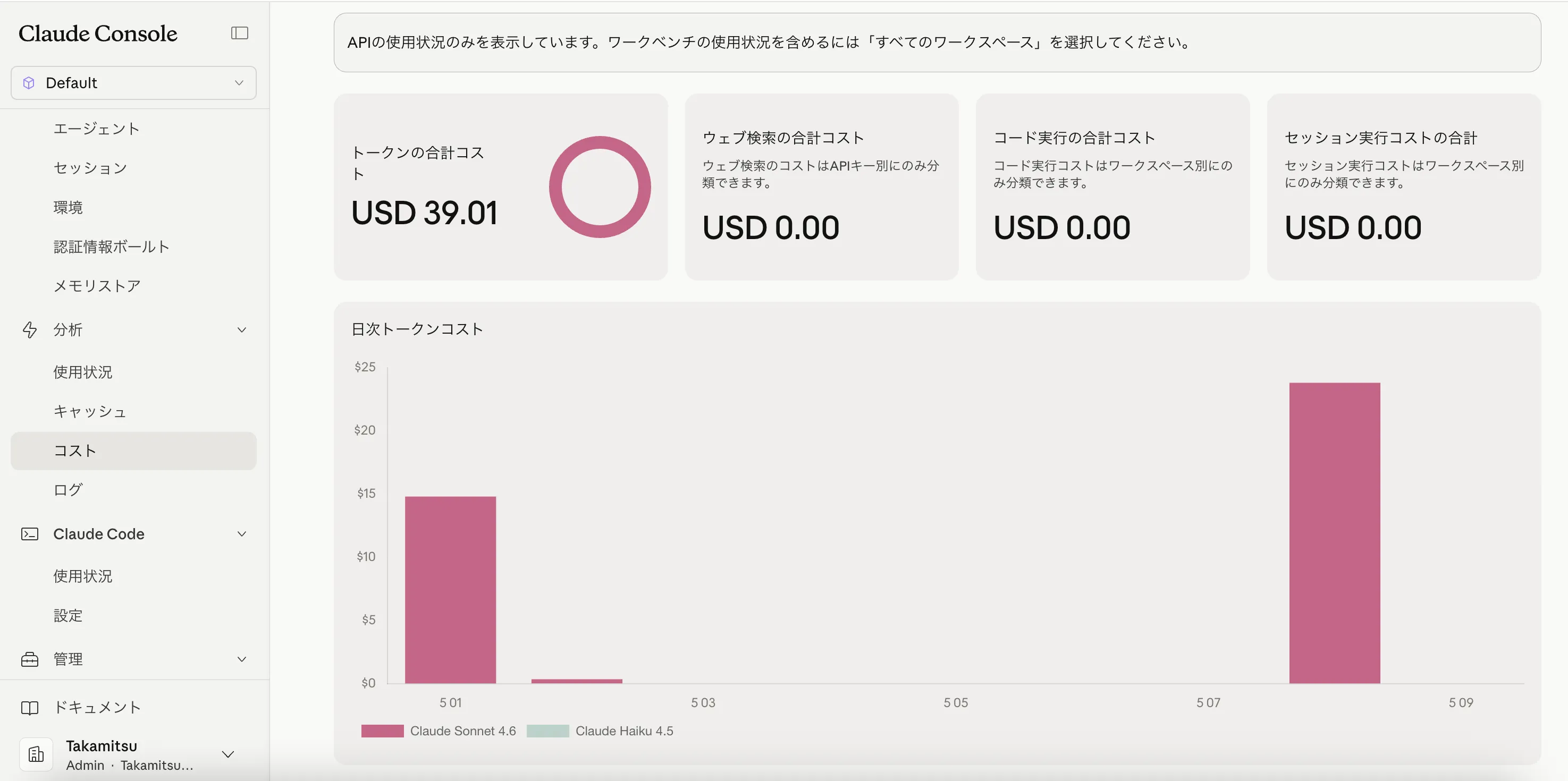
This is the same console switched to the cost view. The roughly $24 bar on May 8 is, almost in its entirety, this incident’s $23.82; the difference from the monthly total of $39.01 at the top is ordinary usage on other days.
(The spike sits on the 8th rather than the 9th because the console aggregates in UTC. The incident, from the night of May 8 to the early hours of May 9 JST, all falls within May 8 UTC (09:40–18:45).)
Anatomy of the Causes
The Direct Cause: The Cron Job
When I ran openclaw cron list, there it was.
ID:       3b169100-2c08-4894-925f-e553f915ed32
Name:     assemble-poll-taisho_jyouzojyo
Schedule: every 5m
Status:   error
Last error: LLM request rejected: Your credit balance is too low...
Consecutive errors: 12
The job’s payload (the message that restarts the agent) reads like this.
Poll the assemble.sh process for taisho_jyouzojyo (session id: ember-ocean). If it has completed (exit code 0), cancel this cron job and proceed to Step 3: run create_ja_metadata.sh, then translate_metadata.sh, then make_thumbnail_auto.sh, then upload.sh — each in sequence…
Reading it, the content is surprisingly diligent. It specifies the success condition, the cleanup, the remaining steps, and what to do on failure; a careful and complete handover note. The problem was that this 900-character message was re-sent, together with the entire session history, 96 times in one night.
The agent itself decided that it wanted to check every five minutes on a process that takes hours, and registered a cron job to wake itself up. There was nothing foolish anywhere in that judgment, though…
Behind the Scenes: The High Cost of a Single Turn
OpenClaw’s cron job is designed to wake the agent at the specified time, send the entire session context at that point to the LLM, and run one turn. In other words, every time the cron job fires, a complete agent turn goes around and the whole context is loaded again.
At this point the session’s jsonl had already bloated to 10.4 MB, about 750,000 tokens. I had been making several scenes in a row and had never once run /reset.
One cron fire consisted of the following.
- Send the system prompt + instruction file + 750,000 tokens of history to the Anthropic API (about $0.20 including cache reads)
- The LLM decides “still running, nothing to do”
- Append that response (a few hundred tokens) to the session (making it bigger still)
This continued every five minutes for about nine hours, 97 times, and came to $23.82.
The Root Cause: Tool Selection by LLMs
The agent’s instruction file (SOUL.md) did not say “do not use cron.” Nor did it clearly specify polling inline. The agent reasoned straightforwardly: I want to resume a few hours later → I want to schedule it → I can use cron.
An LLM picks whatever looks most natural among the tools it has been given. It chose the cron job because it was among the options, which makes this a problem on the instruction file’s side for not forbidding it.
In addition, the OpenClaw of that time had a separate bug where messages disappear when the WhatsApp socket has been idle for a long time, and this had already been observed about a week earlier. I think it is quite likely that the agent also reasoned: I do not want to miss a notification during a long idle → a mechanism that wakes me periodically would be reassuring → cron. In other words, the agent correctly diagnosed a real defect and designed a way around it. The design was sound, but the billing model turned it into a disaster. Two bugs amplified each other and led to a cost explosion.
The Agent Believed It Had Stopped the Cron Job
This is the most important part of the incident, which I learned by reading the session log one message at a time.
Partway through, the agent understood the situation correctly. At 22:35 assemble died with SIGKILL, and at 22:36 it sent me a notification. Forty-five seconds later the cron job fired again, and the agent’s reasoning log reads as follows.
The assemble process already failed with SIGKILL. I already reported this to the owner. This cron job should now be cancelled (no further action needed). The process failed, I already sent the notification. I should just respond with NO_REPLY to cancel/stop the cron.
It then returned NO_REPLY. Five minutes later the cron job fired again, and the agent returned NO_REPLY again.
NO_REPLY is OpenClaw’s “silent token”: when the agent’s response is nothing but this string, the delivery layer strips it and ends the turn without sending anything to the chat. It was originally a mechanism for group chats, to make the agent stay quiet when it has not been addressed, and a turn woken by a cron job is treated the same way. What gets suppressed is only two things, the direct send to the chat and the fallback summary send; it does not touch the schedule at all.
The only way to stop it is to call the cron tool with action: delete (or openclaw cron delete <ID> from the CLI). In other words, the agent had mistaken a token that declares “I will not speak this time” for a command that says “do not wake me from next time on.” Only the names are similar; one is a judgment about the content of the output, the other an operation on the scheduler.
The measured numbers for the night:
| Item | Count |
|---|---|
cron tool calls, total | 1 — action: add (18:35:23) |
cron tool calls with action: delete | 0 |
| Cron fires | 97 (18:40:44 → 03:45:40) |
Assistant turns answering NO_REPLY | 47 |
The agent was woken 47 times, loaded 750,000 tokens of context each time, correctly reached the conclusion that there was nothing to do, and kept expressing that conclusion by staying silent. To the end, it believed that staying silent was the cancellation.
The cron payload it wrote itself states clearly, If it failed, cancel this cron job. The second half, the notification, it executed perfectly. For the first half, the cancellation, it held a clear but mistaken assumption: that not replying to a scheduled job unschedules it.
This is different from what is commonly called hallucination. Nothing was fabricated, and the reports were honest. The agent’s understanding of the mechanism was wrong, and it had no way to check that mistake on its own.
Why It Could Not Notice
Because from within a single turn, “I cancelled it” and “I could not cancel it” cannot be distinguished.
If the cancellation had succeeded, the next fire would not come. If it had failed, the next fire would come. But when the next fire came, the agent was woken as a new turn and simply decided again from scratch that there was nothing to do; it did not think “I should have stopped this, so why is it running?” There was no mechanism to check whether its own cleanup had taken effect.
The cost of this one assumption was about $12 (47 × roughly $0.25), nearly half of the incident’s total.
The Principle Learned
If you let an agent perform an operation whose result it cannot check for itself, it will keep repeating the wrong method, with confidence, while being billed.
Any operation an agent performs on its own scheduling, state, or lifecycle must be given a way to confirm it, in a form it can read back in the same turn. Pair “I deleted it” immediately with “I fetched the list and confirmed it is gone” as one set. Written into the instruction file, it looks like this.
### Hard rule: verify your own cleanup

After any operation that changes your own scheduling or lifecycle
(cron delete, session reset, job cancel), you MUST read the state
back in the same turn and confirm the change took effect.
Never treat "not replying" or "doing nothing" as a cancellation.
How I Fixed It
1. Delete the Cron Job Immediately
openclaw cron list
# → assemble-poll-taisho_jyouzojyo shows up

openclaw cron delete 3b169100-2c08-4894-925f-e553f915ed32

openclaw cron list
# → confirm "No cron jobs."
The point is to delete before topping up the credit. I did not want to stop production, so I did think about putting some money into the API for the time being, but with the cron job still there, it would have recurred the moment the money landed.
2. Add a Hard Rule to SOUL.md
### Hard rule: never use cron to poll an in-pipeline process

Long-running steps (assemble, upload) must be polled inline within
the same agent turn using the `process` tool. Do **not** schedule a
cron job to wake the agent and re-check progress.

Why: every cron fire is a fresh agent turn that re-loads the entire
session context. (Real incident, 2026-05-09: a single assemble-poll
cron at 5-min cadence consumed $23.82 in one night.)
I put the incident’s dollar figure in the text so that a future me, or a copied agent reading it, understands immediately that breaking this costs $23. Writing the reason also lets it make judgments by analogy in cases that were not anticipated.
3. Split the Pipeline into Two Phases
The original design ran Steps 1 to 6 fully automatically from one press of the OK button. I split it into:
- Phase A: OK pressed → select audio → launch assemble in the background → the agent exits immediately
- Phase B: I send
Resume <scene_id>whenever I like → metadata → translation → thumbnail → upload
This way the hours of assemble become completely invisible to the agent, and the concept of polling itself goes away.
The burden on my side is only remembering the scene_id. That is information a human already has, so the cost is effectively zero. Essentially, this was a decision to give up on full automation. In the world of LLM agents, there may be many cases where giving up on full automation improves both cost and architecture.
4. Reset the Session Context
Cutting off the 10 MB session brought the per-turn cost back to normal (~$0.01).
Four Key Lessons
1. Polling Is Far Heavier Than It Feels
“Let’s check lightly every five minutes” is a sufficiently sparse interval for a human, but for an LLM agent, one tick costs $0.20 to $1. The cost a human imagines for “a quick check” and the cost of an LLM “running a turn” differ by orders of magnitude.
2. Larger Sessions Mean Exponentially Pricier Turns
With a 10 MB session, the cache-read cost per turn exceeds $0.20. Running /reset once a week, or whenever the file passes a few MB, is realistic.
3. Restrict Convenient Tools in Instruction Files
An LLM uses tools that are not explicitly forbidden because they “look handy.” The instruction file needed to state not only what I want done but also what I do not want done, with reasons.
4. A Single Human Touch Outperforms Full Automation
Compared with running fully automatically for hours, having a person give one more push around the time it finishes means smaller damage on failure, a simpler architecture, and a system that can wait for the person’s convenience. When you feel tempted to aim for “fully automatic” in an LLM agent design, I think it is worth calculating what changes if a human presses once.
What to Do If Your Agent’s Costs Spike
I think others will hit the same pattern, on OpenClaw or on other agent runtimes, so I am leaving the steps here.
# 1. Stop the crons (first priority)
openclaw cron list
openclaw cron delete <ID>   # every suspicious one

# 2. Check session sizes
ls -la ~/.openclaw/agents/*/sessions/*.jsonl

# 3. Do both BEFORE adding credit
After that, check the actual usage log in the API console, and read the lines around the time of the explosion in that agent’s session log; you will find the cron fires or a retry loop. Once the cause is clear, write it back into the instruction file as a hard rule to prevent the next one. As prevention, a habit of looking at openclaw cron list once a month, /reset when the session passes a few MB, and setting API credit to “stop when used up” are safe. Monthly auto-recharge makes the damage grow in an accident.
Summary
- Amount: $23.82 (of which about $12 was the 47 fires spent “thinking it had stopped”)
- Time: about 9 hours (5/8 18:40 → 5/9 03:45), 97 fires, 96 billed
- Causes: (a) the agent used a cron job to poll a long-running process × (b) the session had bloated to 10 MB × (c) it got the way of stopping the cron job wrong and had no means of noticing
- Fixes: (1) delete the cron job (2) add a hard rule to the instruction file (3) split the pipeline into two phases (4) reset the session
- Lesson one: when you feel like having an LLM agent “poll,” calculate the cost before designing. Having a human pull the trigger for phase two is often cheaper.
- Lesson two: an operation whose result cannot be observed gets repeated wrong. Pair every operation that changes the agent’s own state with a read-back check within the same turn.
openclaw cron is convenient, but it was also a tool exactly as frightening as it was convenient.
And the most frightening thing was that the agent could keep judging correctly without any means of noticing it was wrong. That night, the agent correctly reached the conclusion 47 times that there was nothing to do, and those 47 times were billed just as they were.
The whole story of handing a YouTube channel’s operation to an AI agent, including this incident, is collected in “We Handed an Entire YouTube Channel to an AI Agent.” If you are considering putting AI agents to work in your business, feel free to get in touch.