
Mass-Producing 100 Videos with AI Agents: What Facing Quality as a Creator Taught Me
On our YouTube channel Sounds of Rain in Old Japan, we prepared scenarios for 100 Shorts and let an AI agent produce them unattended in batches of ten. By the time the first twenty were made, the pipeline ran without stopping, yet silently produced videos filled with errors that raised no alarms. From designing an asynchronous review workflow with spreadsheets to the difference between automated metrics and the human eye, and how building a system delegable to others unexpectedly eased my own workload, here is the trial-and-error process behind our unattended batch production.
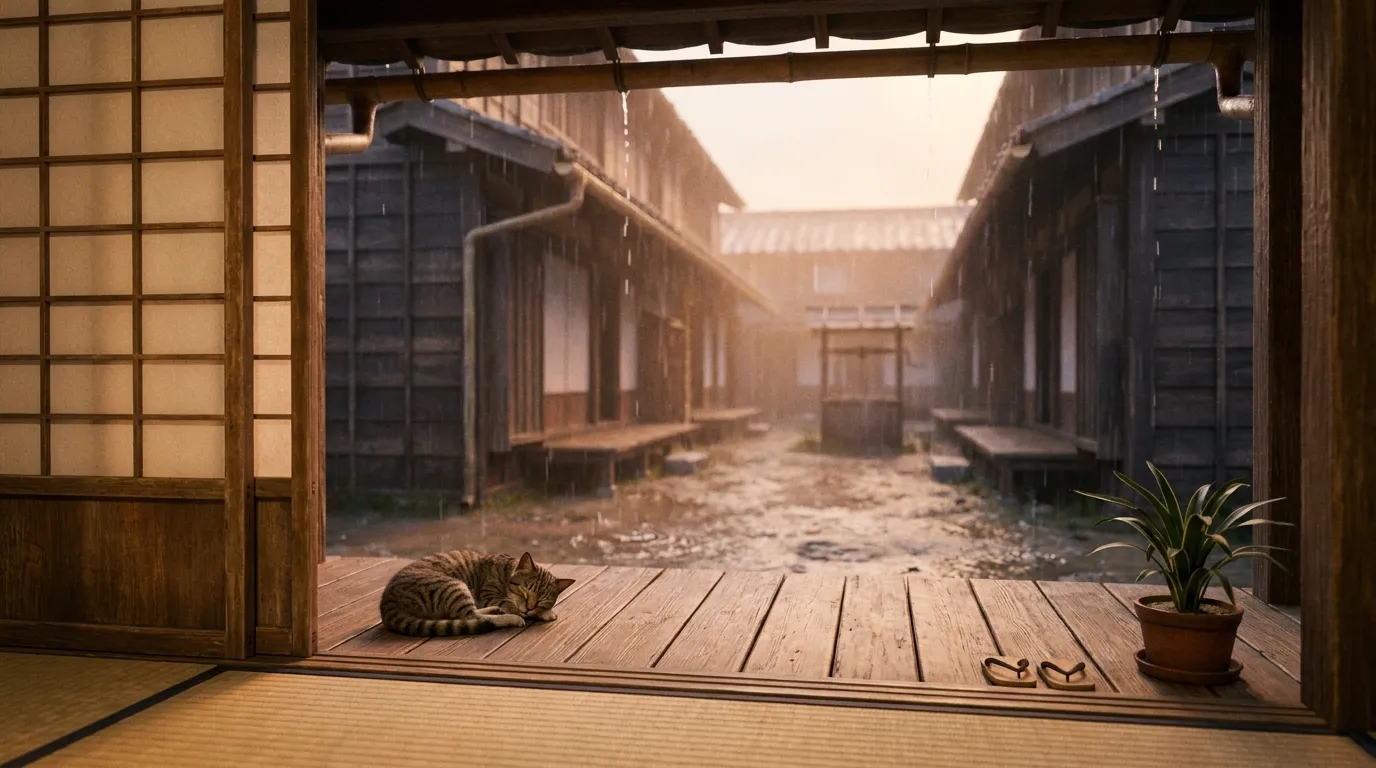
In “Running a Video Channel Entirely with AI Agents,” I wrote about getting our pipeline to the point where sending a single message from WhatsApp produced a finished video. Starting this summer, I took it one step further: queuing up planned production for 100 videos all at once, letting an AI agent work through them from top to bottom completely unattended.
However, I did not generate all 100 videos in a single run. Knowing that adjustments to the video engine’s behavior or prompt flaws would inevitably emerge along the way, I prepared scenarios for 100 videos and produced them in batches of 10.
Getting one video to generate successfully and sustaining continuous mass production presented entirely different challenges. Once batch production was running, mechanical failures that halted the pipeline rarely occurred. In their place, a different problem appeared almost daily: the code ran without a single error, yet the resulting video content was fundamentally wrong.
In this article, I want to share the trial-and-error process of how we set up human inspection in the early stages of running unattended mass production.
Replacing One-by-One Instructions with a 100-Video Queue
Short video production was already automated with a set of scripts covering everything from image generation to saving drafts in YouTube Studio. However, having to think up and submit seven parameters (era, location, time of day, season, rain type, directorial tone, and whether to include a cat) for every single video was not a habit suited to someone like me, who struggles with performing small, repetitive tasks on a fixed schedule.
So I decided to turn the planned production into a queue that could be fed in bulk. I wrote out 100 scenes into a YAML file and built a runner that could work through them from top to bottom.
- id: 1
  scene_id: edo_nagaya
  era: Edo
  place: Tenement eaves
  time: Morning
  season: Spring
  rain: Gentle drizzle
  director: kinoshita
  cat: false
  status: todo
With a single command, the runner pulls the next 10 unstarted entries from the top and produces them sequentially. Image generation, composition selection, video generation, rain-audio synthesis, translation into 14 languages, metadata creation, and uploading private drafts to YouTube all proceed completely unattended.
Through trial and error, we added several intentional design choices to this mass-production process.
One was running the agent in an independent subprocess for each scene. When multiple videos are generated within the same session, the context formed during the previous scene bleeds into the next scene’s image selection and descriptions. To prevent this context contamination, the architecture resets the process context completely clean for every single video.
Another was stopping the entire batch by default whenever a failure occurs. When a run crashes halfway through, it is rarely an issue with an individual scene; it is almost always an API rate limit, an authentication issue, or a flaw in a shared prompt template. Letting the batch keep running would simply repeat the same failure across the remaining videos, wasting time and API credits.
We also chose not to automate YouTube publishing via API, opting instead to upload each video as a private draft and schedule the release manually. On this channel, we publish one video a day. If you attempt to automate scheduled releases via the API, a date calculation discrepancy or unexpected API behavior risks accidentally publishing multiple videos at once. We decided to fully automate production up to the upload stage, while retaining manual human control over the final moment a video goes out into the world.
Failures Without Errors
After running the first batch, I was looking through the drafts lined up in YouTube Studio when I noticed something odd.
Every single completed video was set in the Edo period.
When I wrote the backlog, I had balanced the overall distribution: about 70% were Edo and Kyoto cityscapes, which perform well with viewers, and 30% were from other eras. I had also grouped the list by historical period, starting with Edo. The runner simply worked its way down from the top, churning out Edo scenes one after another—leaving the channel with a 100% Edo lineup. I had originally written that scenario file intending to generate all 100 at once; when I later decided to be cautious and run them in batches of 10, I should have realized that the purpose of the scenario list had changed.
Around the same time, another incident caused the agent to stall. The prompt requested “the entrance dirt floor of a geisha house (okiya) in Gion during the Edo period.” The resulting image had flawless lattice doors, paper lanterns, and a sleeping cat, and the rain audio matched beautifully. However, the first line of the prompt generated by the agent somehow read “a brothel in the Yoshiwara red-light district of Edo,” and the title was set to Yoshiwara as well. Because the visuals could easily pass for either scene, you could never catch the discrepancy just by looking at the video.
The agent caught this mismatch right before translating into 14 languages. It paused and left a confirmation message in the batch log: “Should I rewrite this to Gion and proceed, publish as Yoshiwara, or regenerate from scratch?”
In terms of judgment, stopping was the right decision. But because this was an unattended subprocess running overnight, there was naturally no human around to answer. The timed-out question sat in the log file, and the batch marked that row as an error and moved on to the next.
We had eliminated intermediate human checks to achieve full automation, yet an escalation path to humans during exceptions still remained. Automation and exception handling were out of sync.
After Removing In-Flight Checks: Where Do Humans Look?
When I reviewed the combined results of the first two batches, I found 11 defects that required fixing. Zero failures stemmed from infrastructure—no scripts crashed, and no APIs returned errors. Every remaining issue was a flaw in the actual content: a lantern flame so huge it looked like a forest fire, a cat whose tail split into two halfway through, or a roof with a structure that simply does not exist in real life.
In our earlier long-form video pipeline, a human sat in the loop, approving checkpoints in a browser along the way. But applying that to mass-producing 100 Shorts would mean the agent spent most of its time waiting for a human glued to the screen to click “OK,” defeating the entire purpose of unattended production.
So we dropped the intermediate human checks and switched to reviewing everything in bulk after completion. Still, 11 problematic videos out of 2 batches (20 videos) was a high failure rate.
To make logging issues as frictionless as possible, I set up a review sheet using Google Sheets.
The batch runs overnight, generating 10 videos automatically and saving them as private drafts in YouTube Studio. The next morning, at my convenience, I watch the videos and log only the ones that need fixes into the spreadsheet. The agent then reads that sheet and begins making corrections. This established an asynchronous collaboration loop between human and agent.
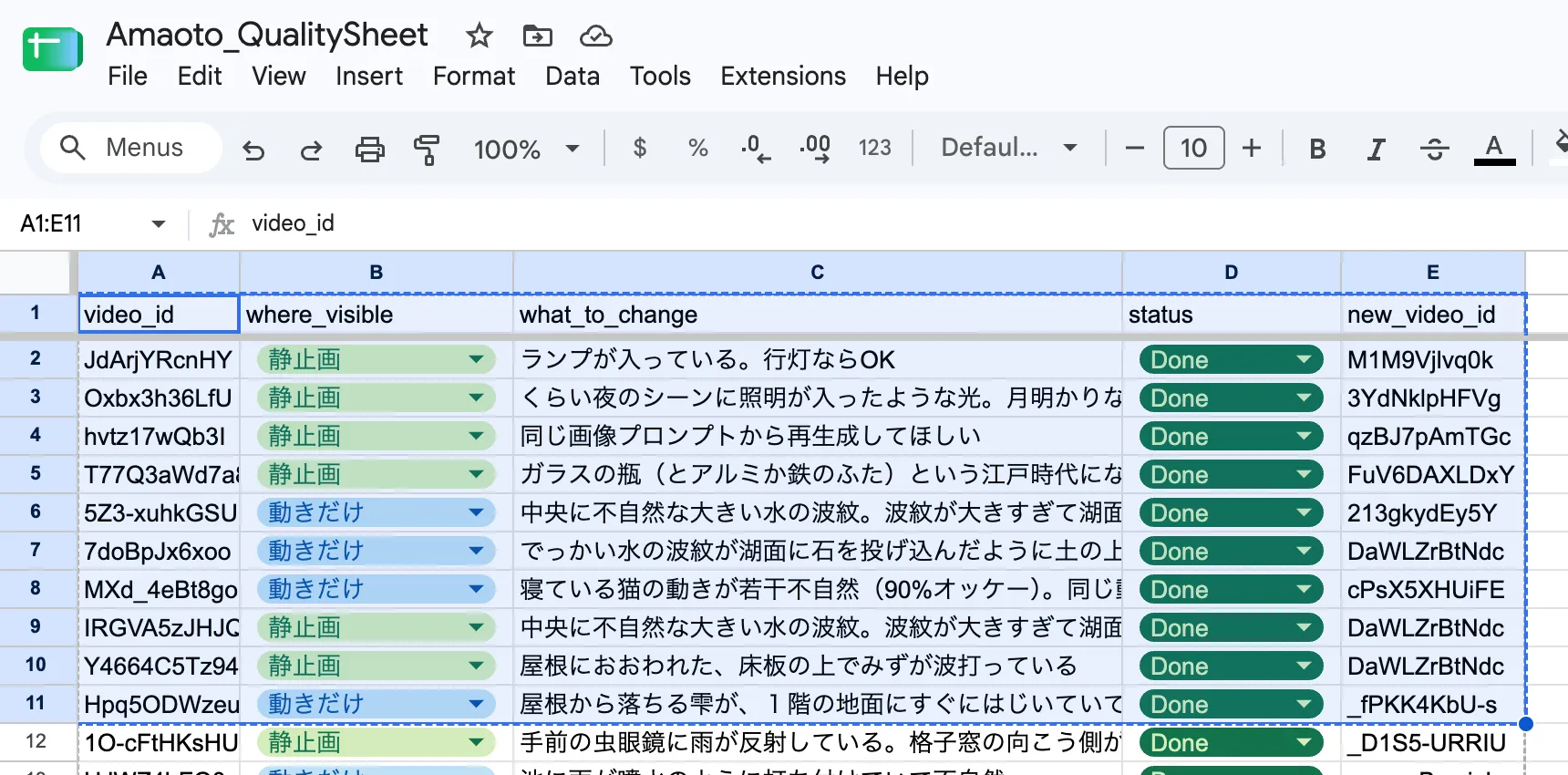
The primary reason I chose Google Sheets was that it made it easy to delegate verification to an intern working with us. Initially, I designed the sheet with four columns:
video_id / redo_from / what_to_change / status
However, this spreadsheet design—which I thought was straightforward and threw together on the spot—led to another instructive failure.
How Asking for “Root Causes” on the Review Sheet Failed
I thought the problem descriptions on the sheet were clear and precise:
- “A modern lamp is visible. A traditional andon lantern is fine.”
- “There is a glass bottle that did not exist in the Edo period. Reject.”
- “An unnatural, massive water ripple in the center, looking like a stone was thrown into a lake.”
The problem lay in the redo_from column (where to restart the generation).
Deciding whether to restart from image generation or from video generation looks easy when looking at the finished video, but in reality, it is not.
Without digging into the underlying assets, you cannot know whether the root cause lies in the still-image prompt or in the video model’s interpretation of motion. Yet when a column exists, the reviewer kindly tries to fill it in by guessing: “The still image looks clean, so it must be an issue with how the video prompt handles motion.”
In a scene set in the garden of a Heian-period temple, an unnaturally huge ripple expanded across the ground. The redo_from column was marked “video generation,” so the agent dutifully followed instructions, adjusted the video prompt, and ended up regenerating the video five times.
No matter how many constraints were piled onto the video prompt—“suppress ripples,” “do not agitate the water surface”—the ripple refused to disappear. When I investigated, I discovered that the original still-image prompt had included the phrase “water droplets falling to the ground creating small ripples” from the very beginning. Because ripples were specified at the still-image stage and already drawn into the static image, no amount of negative prompting on the video model could ever erase them.
Once I deleted that single sentence about ripples from the image prompt, the issue was cleanly resolved in the very next video generation run.
The reviewer’s observation was not wrong. Identifying the symptom—“the motion looks wrong”—was spot on. The failure lay in our workflow design: asking the reviewer to diagnose the root cause, and then turning that guess directly into an automated regeneration command.
Reflecting on this, I realized what the reviewer actually needed was an unambiguous, binary choice: “Is the problem visible when the video is paused, or only when it is playing?”
I renamed the column from redo_from to where_visible (visible in still image / visible only in video).
Reviewers now only specify where_visible along with a description of the symptom (“what looks off”). Diagnosing the root cause was decoupled and handed to an automated investigation procedure in the pipeline. The pipeline first checks if the problematic keyword exists in the image prompt, then inspects the still image, and only checks video parameters if the first two checks yield nothing.
In the next batch, four issues were reported as “visible only in video.” Upon inspection, three of them actually originated in the image prompt. For instance, the observation that “the deer in the background is unnaturally frozen” was simply handled by discovering that the image prompt had explicitly called for a deer to be drawn.
Making It Delegable Eased My Own Work
Initially, this review sheet was designed so I could delegate the checking to an intern. However, because our schedules often did not align, I ended up doing most of the quality reviews myself.
That was when I realized something important: simplifying the system so an intern could check videos without getting confused dramatically reduced my own cognitive load as well.
If I had built the workflow assuming I would review everything myself, I almost certainly would have sat in front of YouTube Studio, opened up the prompts on the spot, manually tweaked them, and re-run generations by hand. Constantly thinking through prompt adjustments for every video would have been mentally exhausting.
When a system is designed to be handed off to someone else, however, the roles of observer and fixer are cleanly separated.
All the observer has to do is watch the finished video, select whether the issue is visible paused or in motion, and honestly jot down what looks strange. There is no need to deduce the cause, and no need to touch code or prompts. All downstream investigation procedures are embedded in the agent, and the necessary diagnostic context is assembled with a single command.
Failures also accumulated as institutional knowledge:
- “Footwear belongs on the entrance dirt floor, never on wooden floorboards.”
- “For distant streetscapes, specify the era through wall textures and second-story heights, not roof shapes.”
- “When depicting the crawling entrance (nijiriguchi) of a teahouse, lower the camera to tatami level.”
- “Never include cats in Jomon or Yayoi era scenes.”
Instead of treating sheet feedback as one-off prompt fixes, the agent was instructed to append each rule—with its rationale—to a central production rules file. Subsequent batches were then generated taking those accumulated rules into account.
Motion Detection and Historical Authenticity
To automatically detect defects that only appear in motion, I had the agent build a specialized analysis tool. It calculates optical flow (pixel displacement) across video frames and overlays high-motion areas onto the original image in red.
This allowed the agent to detect, at a glance, issues where static structures like pillars or floorboards were unnaturally warping.
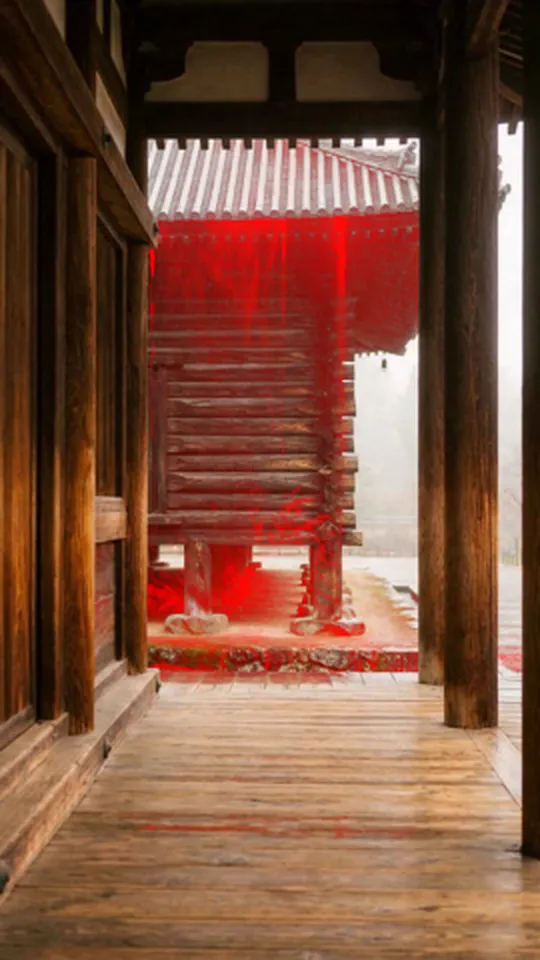
In practice, however, we quickly ran into a fundamental limitation: while the tool could highlight where motion occurred in red, it could not judge whether that motion was natural for the scene or historically authentic.
A striking example occurred with a scene depicting the corridors of the Shosoin storehouse in Nara.
When the generated video was run through the analysis tool, a massive crimson band appeared across the center of the frame—stretching from the Shosoin’s roof down through its walls and beneath the raised floor.
Analyzing the red-highlighted image and the accompanying numbers, the agent logged the following diagnosis:
“The video model cannot maintain the fine timber-joint texture of Shosoin’s azekura-zukuri log-cabin construction, causing the entire frame to boil. This is a structural limitation of the video generation engine, so we should abandon this scene.”
Yet when I actually played the video, something completely different was happening. The review sheet read:
“Water is cascading off the Shosoin’s roof like a massive waterfall.”
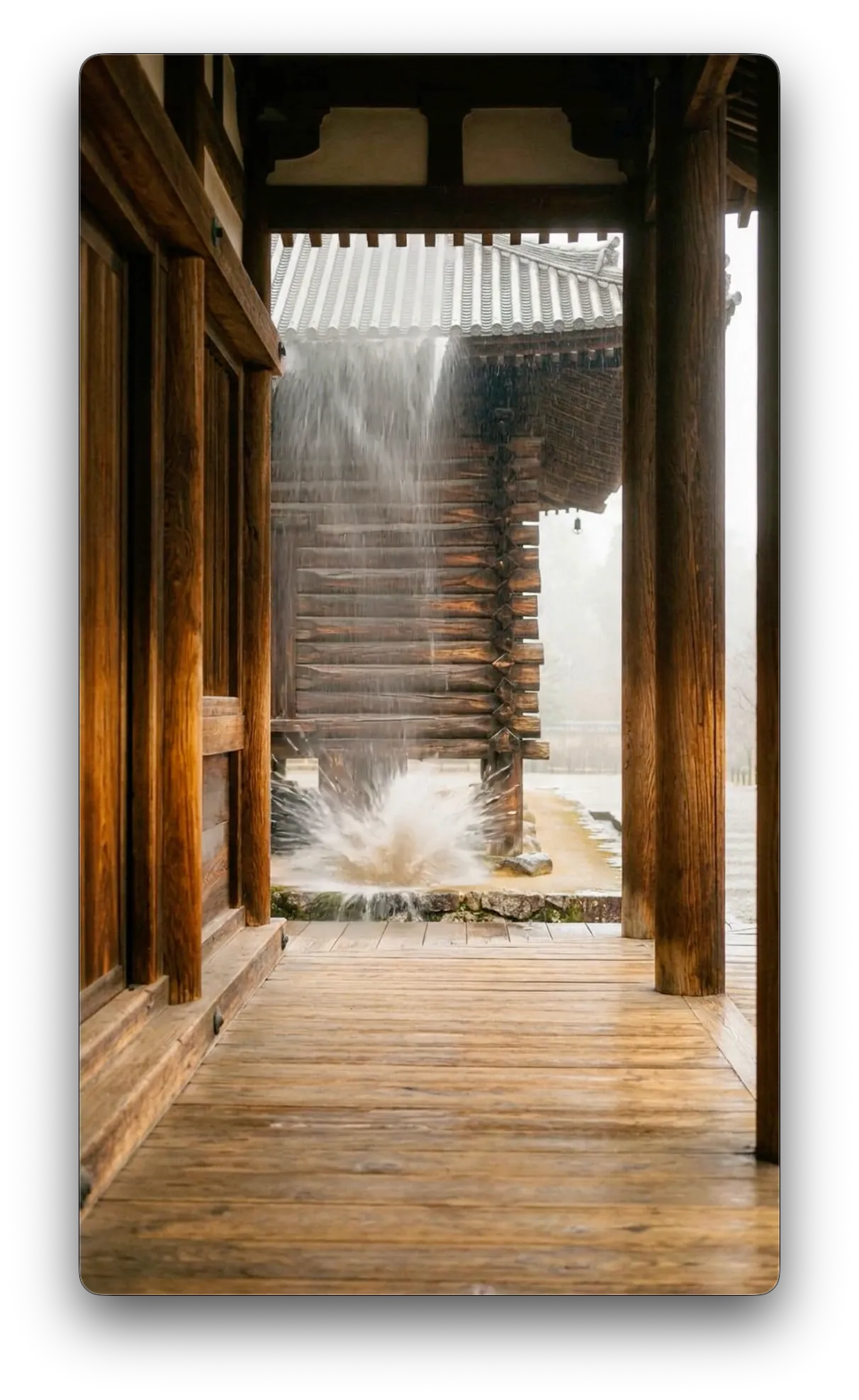
The “red mass” the agent saw through the tool was not a texture collapse at all; it was the intense motion of a torrent of water.
There was no need to abandon the Shosoin scene. It was an issue that could be easily resolved by adjusting the video prompt.
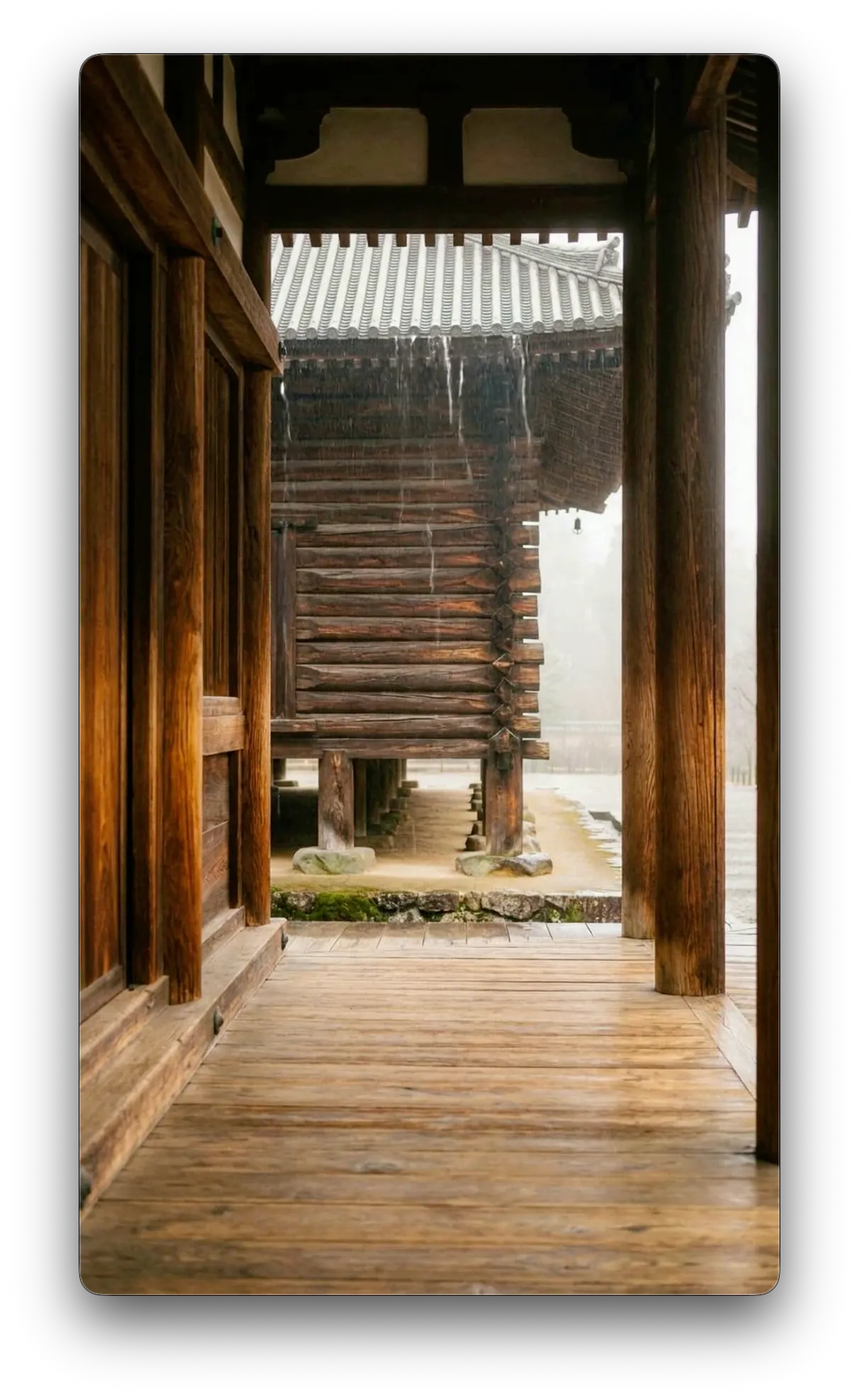
The measurement tool and the agent looked at the numbers, deemed it a “model limitation,” and almost gave up. But to a human eye watching the clip, it was immediately obvious: “it’s just water pouring off the roof.” Once the actual cause was understood, the scene was saved with a single prompt edit instead of being discarded.
Similar issues occurred constantly with historical accuracy.
In a scene showing a Heian-period tower gate (romon), the agent wrote a prompt that removed all wooden floorboards and turned the entire ground into packed dirt to prevent water from rippling on the floor. The water motion stopped completely, and the automated metrics passed. But the moment I saw the image, something felt distinctly wrong.
“Isn’t it strange for a monumental gate to have no threshold? If it’s all dirt, it just looks like an empty covered lot,” I noted in the spreadsheet. Zooming in, the foundation stones were there, but there was not a single threshold beam—it ceased to function as a gate. In an effort to satisfy numerical thresholds by removing the floor, the architectural integrity of the gate itself had been destroyed.
The same happened when the signboard of an inn along the Kiso Road displayed the single Chinese character “宿” (inn) in clean calligraphy. To the AI, it was flawless kanji. But in Edo-period post towns, inns never hung signs with just the single character “宿”; they used specific trade names like “Kameya” or the formal title “Hatago” / “Oyado.” A single character “宿” was a modern abbreviation. An AI can catch corrupted symbols, but recognizing an anachronistic modern convention requires eyes trained in Japanese history and culture.
From Giving Instructions to Evaluating Correctness
Six months after beginning our experiments with AI agents, and after running dozens of videos through a 100-video mass-production pipeline, one realization stood out: the further automation advances, the clearer the creator’s true job becomes.
That job is not issuing granular instructions. It is evaluating whether the finished work is genuinely natural and authentic. And making that judgment requires deep knowledge of the subject and scene—not superficial prompt-engineering tricks.
To build tools for video production, I had stepped into the creator’s shoes and run a channel myself. The various insights accumulated over that time, however brief, translated directly into designing a quality verification system alongside AI.
Distinguishing whether the output matches the original intent, and feeding those corrections back into the next iteration of automation rules, is work that still requires a human eye. The true difficulty of operationalizing AI agents in production lies in connecting that creator’s eye to the automated pipeline without creating unnecessary friction.
If you are exploring how to automate operations with generative AI or wrestling with how to verify and assure the quality of AI-generated deliverables, feel free to get in touch. Based on our hands-on trial-and-error in production, we can help you design a sustainable workflow tailored to your needs.